Showing posts with label Apple iPad News. Show all posts

Friday, May 30, 2014

PressReader Brings 1500+ Updated Newspapers to iPad and iPhone

With PressReader 2.2, the dailies won’t ever be old news. You can simply switch on the iPad application and indulge on today’s happenings. PressReader 2.2, upon receiving upgrades from its previous versions, makes reading the news an even easier experience. Navigating through the paper’s various sections is easy, as you scroll through from the front page to the Sports section. In truth, it’s even simpler to read compared to an actual newspaper. You can do away with turning the large pages, while you jump from one section to another.

Press Reader has several new features. Now it has a Library Shelf feature which appears like a newsstand. You have the option of picking from a wide variety of newspapers, giving you a clear picture of what’s happening all over the world. It automatically removes stored newspapers from the iPad’s database, to free up memory space. If you have a knack for storing old news, however, you can simply switch off the feature.


Press Reader 2.2 also features newspaper printing and quick messaging and news sharing on Facebook. Traditional folks who prefer the novelty of reading an actual newspaper can simply print all of the publications that they read regularly. Socially responsible folks, on the other hand, can alert their friends about certain reports via their social networking accounts.

Perhaps the best thing about this iPad application is it’s free. It is also compatible with the iPhone and the iPod Touch, running on at least iOS 3.1.2. You can download it through this via direct iTunes link.

Saturday, May 24, 2014

Transfer Photos Directly From Your Digital Camera to iPad Using Camera Connection Kit

With iPad Camera connection kit, you can import photos and videos from a digital camera or SD card directly to your iPad. The kit also supports most popular photos services including Flickr, MobileMe and others. What’s more, the iPad Camera Connection Kit costs a miserly $29.

The Kit provides two simple ways of importing your photos. One way is use your SD card connector to upload photos via a SD card. The other option is to use the USB connector so that you can connect your camera directly to the iPad. The usage is intuititve – as soon as you plug the connector to your iPad, it opens the photo app and shows the photos on your card. It may take a while for all your photos to show up, so be patient. You can then either choose some photos or all photos to be imported. Further, TidBITS reports that you can use a headset to make VoIP calls over Skype, and that the audio quality is excellent. You can also use a Bluetooth headset with the iPad. See this Demo video.

Wednesday, May 21, 2014

iPad vs Windows 7 Tablet

The windows seven tablet lacks the smoothness of ios and lags quite a bit but it makes it all up up being able to install a lot of windows programs along with having a camera, usb ports, sd slot. This may actually put up a fight against the ipad but in the end the ipad will still prevail.

Sunday, May 18, 2014

Watch Your Favorite Movies In One Apps (For iPhone & iPad)

Warner Bros is now experimenting by selling movies as standalone iOS apps, starting with Inception and The Dark Night. While the apps themselves are free to download, the actual movies available as in-app purchases.

Warner Bros. has played it smart by including bonus features, such as games, soundtracks, and integration with Twitter and Facebook to promote hit dialogues. The free versions are teasers which lure users to buy in full movie via an “in-app” purchase button. While “The Dark Knight” costs $9.99, Inception is priced higher at $11.99. Both the paid offerings include innovations such as the ability to watch the film in as many as 34 languages and the ability to clip sounds and customize ringtones. IMO, 10 bucks for a few ringtones and wallpapers surely sounds like an overkill.

Once you’ve paid for a movie, you can choose to either stream the movie to your iPad or download it to your iPad for later viewing. Both the apps are available in over 30 countries and provide an alternative to users in countries that do not have access to films for purchase via the iTunes Store. Warner Bros is already working on app editions for other movies to be launched throughout the year. Unfortunately, Apple’s DRM restrictions imply that users can’t transfer these movies to their Mac or DVD players, despite making a hefty in-app purchase.

Have a look a video of the Warner Bros ‘The Dark Knight’ app in action.


Thursday, April 28, 2011

Don't Update To iOS 4.3 (IPhone Jailbreaker)


During the iPad 2 event, Apple mentioned the iOS 4.3 will be available to all users on March 11. Our recommendation is to stay on iOS 4.2.1 a month after 4.3 is released as all its going to be is a headache.

BigBoss also pointed out the upcoming iOS update will come with an implementation of address space layout randomization (ASLR). Such implementation change will impact the way mobile substrate works. If you haven’t heard of mobile substrate, it is a code library that other tweaks depend on. So if mobile substrate doesn’t work with iOS 4.3, your favorite hacks like WinterBoard, BiteSMS, etc will not work either.

With 4.3 comes apple’s implementation of address space layout randomization (ASLR). In short, this will mess up the way mobile substrate works. You will need a new mobile substrate in order to use your favorite tweaks such as winterboard, sbsettings, bitesms, folder enhancer, etc. So you should definitely avoid 4.3 until an “official” jailbreak is released for it. Of course we will announce when that is right here.


Therefore, avoid upgrading to iOS 4.3 until a stable jailbreak solution is released.

Wednesday, March 2, 2011

Apple Announced Same Price Of iPad 2

As a rumors, Apple is revealing the iPad 2. The iPad 2 price is just the same as previous generation iPad which places it with a competitive edge over other tablets in the market. More specs of the thinner, faster processor.

What we are most amazed by is how Apple managed to decrease the iPad’s thickness, pack a twice as powerful A5 processor and still managed to give us 10 hours of battery life on this. With the addition of the FaceTime cameras this is going to make twice as much sales as the first generation iPad.


What's New:
  • Dual Core A5 processor – upto two times faster than previous model
  • Thinner by 33% – 8.8mm as compared to 13.4mm
  • Enhanced graphics – new GPU nine times faster
  • Two cameras – front and rear
  • Built in Gyroscope like iPhone and iPod Touch for motion detectiion/gaming
  • Battery life same as 10 hours – in spite of new processor and decreased thickness
  • FaceTime ability to make video calls to iPhone 4, iPod Touch 4G and Macs


Moreover, the decreased thickness makes the iPhone 4 an inferiority complex. The iPhone 4 is 9.3mm thick as compared to iPad’s 8.8mm. This is almost as hot as the iPod Touch now. Plus, we must also mention that the iPad 2 is being launched in white color model as well.

The Price

The prices are exactly the same as previous generation iPads. The iPad, as reiterated by Apple, is offered at an unbelievable price as compared to its rivals in the market. The Motorola Xoom, for example is priced at $800(comparable to 32GB 3G model).

Both the iPad 2 and iOS 4.3 will be released on March 11th in the USA and 26 more countries on March 25th.


[Image Via Engadget]

Saturday, February 26, 2011

iPad 2 Will Be Launch On March 2 ?

If you’re planning to purchase an iPad, hold off a bit and wait for a few more days. As reported by All Things D, Apple will host an event on March 2 to unveil the next generation of iPad, currently known as iPad 2.

The new iPad is expected to be thinner and lighter. It’ll possibly come with improved processing power, a better screen, more RAM and storage, as well as, front-facing camera for FaceTime video chat support. Some reports suggested the iPad 2 will even be powered by one of Qualcomm’s multimode chips and will run on both GSM and CDMA-based networks around the world. All these features are just speculations without any confirmation from Apple. Let’s wait for a week more to find out what Apple bundles in the iPad 2.

Monday, August 30, 2010

iPad is Delicious

Apple has started airing a new commercial, iPad is delicious. The commercial pretty much portrays how useful the ipad can be in many many different instances.


iPad To Be Used As Restaurant Menus?

iClarified is reporting that Sharp has demoed a restaurant ordering system using the ipad. This isn’t coming anytime soon but I wouldn’t be surprised if in the future it is how we ordered our food at a restaurant. I can imagine it now. Look at the dish and zoom by pinching, tap to get nutrition info and ingredients, the possibilities are endless. What do you think would this be convinient?


Thursday, June 3, 2010

Guide To Jailbreak iPad 3.2 Using Spirit

The Spirit jailbreak tool is simply awesome. It’s super easy and offers Untethered Jailbreak for all iPhones. For those who are new to jailbreaking, you probably wonder why you need to jailbreak. As you may know, the App Store is tightly controlled by Apple and only approved iPad apps can make into the app store.

For instance, an innovative app that intends to brings dashboard to iPad was rejected by Apple. However, this rejected apps is now available on jailbroken iPad. By jailbreaking your iPad, it brings endless possibilities to this magical device and allows you to install these third party application through cydia. Assumed that you are running iPhone OS 3.2 and iTunes 9.1 on your computer. You may read for further information about Spirit here.

1. Before you proceed to jailbreak process, remember to sync your iPhone with iTunes to backup all your data.

2. Download Spirit jailbreak tool from here (Windows / Mac ) and extract the zip file.

3. Launch the Spirit application

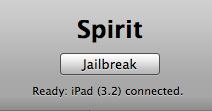
4. Once the Spirit tool is launched, plug into your iPhone via USB and the tool detects your current iPhone OS version. Simply click the “Jailbreak” button.


5. Your iPad will be rebooted and automatically goes through the Spirit jailbreak process. Don’t touch the iPad or disconnect the USB. Just wait. Once completed, your iPad is jailbroken with cydia installed.

6. Please note that cydia on iPad is still in beta. It may crush intermittently. Also, some packages in Cydia are still not compatible with iPad yet and may screw up your system that requires you to restore. If you are scared about that, I suggest you to hold off the jailbreak and wait until cydia for iPad comes out-of-beta.

Tuesday, June 1, 2010

iPad Tip: How to Capture Screenshot

For those iPad users without any iPhone experience, you probably do not know how to capture a screen. Like iPhone and iPod touch, Apple offers the same way to grab a screenshot. Whenever you come across a screen that you want to capture (say, a map), press both “Power/Sleep” and “Home” buttons at the same time. You then notice a momentarily flash. That’s it. The screen is captured and saved.

To view the screenshot, simply launch “Photos” app and tap “Saved Photos”. The screenshot should be there.


Share Your Screenshot With Others

To share the screenshot with your friend, just tap on the photo, tap arrow button and select “Email Photo” to send it via email. Or if you have installed Facebook or iLoader, you can also upload the screenshot directly to your Facebook account for sharing. Or you can also connect the iPad via USB to transfer the image to your computer.