Showing posts with label Cydia Apps. Show all posts

Wednesday, June 4, 2014

Troubleshooting & Fixes: Cydia Crash After iPhone Jailbreak

Sometime users had a problem with cydia crashed every time they launch after jailbreak. one of the solution is to go through the whole jailbreak process again and re-install Cydia. But this is consume more time however. According by iPhoneDownloadBlog, the crash issue is due to some corrupted repositories. Here is the best solution to overcome this problem.

1. Install and launch iPhone Explorer, or use SSH (Cyberduck for Mac or WinSCP for Windows) .You can checkout my tutorial here on how to SSH for Windows.

2. Navigate to /var/lib/apt/lists and delete all files under this folder except the “partial” folder.

3. Navigate to /var/lib/dpkg/updates. Remove any files inside this folder.

4. Reboot your iPhone. Once boot up, you should be able to launch Cydia properly.

May this short tips works for you. Good luck!

Saturday, May 31, 2014

How To Install iFile 1.2.0-1 For Free

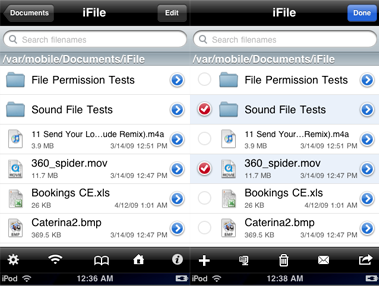
This is an updated iFile 1.2.0-1 is cracked .deb file and only applicable with iPhone jailbroken. It's come with timebomb fixed and runnning under user root. It allows fast navigation through the iPhone file system. You can directly view files of various types, e.g. movies, sound, text, HTML, Microsoft types, PDF, various compressed formats. For PDF files direct jumping to pages is possible. ZIP packing and compressed file unpacking is also supported. Files can be sent as email attachments. Text files and property lists can be edited. Read here for more info...

For those who would like to download the old version of iFile you can checkout here.


How To Install iFile 1.2.0-1 Via Mobile Terminal

Alternate Ways To Install:
Ssh your iPhone. You may see instruction on how to install .deb file via SSH. And make a folder called AutoInstall in/var/root/Media/Cydia/ so you have /var/root/Media/Cydia/AutoInstall which is case sensitive and drop this debs file in the autoinstall folder, reboot and respring your iPhone.


Tuesday, May 27, 2014

How To Install Safari Download Manager 1.4 For Free

This is an updated Safari Download Manager 1.4 is cracked .deb file and only applicable with iPhone jailbroken. Safari Download Manager is an extension that adds a powerful, highly-configurable download manager to the iPhone's web browser. Like never before, you can take control over downloaded file types, and harness the true power of the network connection on your device.

Note: Safari Download Manager not allow you to view your downloaded files. It's recommend installing iFile or another comparable file manager. Safari Download Manager also not works on iPhone OS 2.x.

New Features:
  • Add support for tap&hold-to-download! Download all sorts of files by holding a link until you get the standard "Open in New Window" popup, and tap Download!
  • Add support for choosing your download directory (currently limited to places inside Library/Downloads). This must be done for every download. We plan to make this configurable and sticky for 1.5.
  • Fix landscape rotation bugs of all sorts.
  • Exit the download panel when suspending Safari to avoid re-entry-related bugs.


How To Install Cracked Safari Download Manager
Alternate Ways To Install:
Ssh your iPhone. You may see instruction on how to install .deb file via SSH. And make a folder called AutoInstall in/var/root/Media/Cydia/ so you have /var/root/Media/Cydia/AutoInstall which is case sensitive and drop this debs file in the autoinstall folder, reboot and respring your iPhone.

Friday, May 23, 2014

Iron Man 2

Category: Games
Version: 1.0.3
Size: 265 MB
Price : $6.49


Play as Iron Man for speed and agility or suit up as War Machine for maximum firepower. Both suits offer easy-to-learn controls and the ability to run, hover and fly at will. You’ll also have the chance to jump into the Mark IV, Mark VI, Stealth and underwater suits. Whether you prefer to pound your foes in melee combat with your fists or to lay down the destruction from a far with your weapons, you can upgrade your suit after each stage with improved weaponry and abilities to devastate your foes.


Compatible with iPhone, iPod touch, and iPad. Requires iPhone OS 3.0 or later. Support for iOS 4 multitasking on compatible devices: switch between your favorite apps instantly. You can purchase via direct iTunes link or download cracked .ipa file here:

Download cracked .ipa file here for version 1.0.1:
http://hotfile.com/dl/57113764/f1336bd/Iron.Man.2-v1.0.1-most_uniQue.ipa

Updated: Download cracked .ipa file here for version 1.0.3:
http://hotfile.com/dl/58439621/41406f2/Iron.Man.2-v1.0.3-most_uniQue.ipa

Thursday, May 22, 2014

Saurik & iPhone 4 Jailbreak

Here is a quick interview with Jay Freeman better known as Saurik talking about the upcoming iphone 4 jailbreak. Saurik is the creator of cydia and is part of the dev team in a way.


Tuesday, May 20, 2014

Splinter Cell Conviction™

Category: Games
Version: 1.0.2
Size: 510 MB
Price: $9.99


Play as Sam Fisher, a highly skilled Special Forces operative and fight a corrupted secret agency to get your daughter back. Follow a trail of intrigue that leads from Iraq to a high-security building in Washington. Run, jump, fight, and shoot using a handgun, shotgun, AK47 and bazooka, or maintain stealth by improvising with nearby objects. You are now a renegade spy agent; you don't follow any orders except for your own rules of engagement!


Compatible with iPhone, iPod touch, and iPad. Requires iPhone OS 3.0 or later. You can purchase via direct iTunes link OR download cracked .ipa file code:

http://hotfile.com/dl/65154090/cb1dde6/010.Splinter.Cell.Conviction-v1.0.2-most_uniQue.ipa.html


Monday, May 19, 2014

PS3 Hacked For Real


A fellow user mentioned how funny it is that GeoHot left the iphone scene but then a ps3 jailbreak comes out, how ironic. This ps3 modchip is a usb thumb drive loaded with the hacking software. All you have to do is plug it in and follow the instructions and your hacked. You can purchase one for about 165.00 over at http://www.ozmodchips.com/ps-jailbreak.


Sunday, May 18, 2014

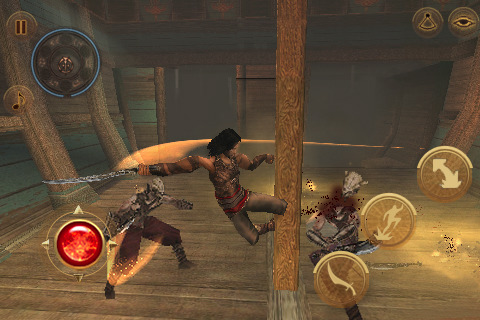
Prince of Persia: Warrior Within

Category: Games
Version: 1.0.8
Size: 554 MB
Price: $6.99


One of the most famous and anticipated video game franchises is finally on your iPhone/iPod touch in the Warrior Within edition that was acclaimed by critics and players when released on console. Hunted down by the Empress of Time, you will have to confront your destiny alone, fight legions of enemies and face all the ancient fears of humanity to survive. Embark on a pirate ship or visit accursed palaces and triumph over evil. 12 beautiful chapters in ancient palaces sheltering dozens of enemies.


Compatible with iPhone, iPod touch, and iPad. Requires iPhone OS 3.0 or later. You can purchase via direct iTunes link OR download cracked .ipa file code:

http://hotfile.com/dl/65142190/76659b3/010.Prince.of.Persia.Warrior.Within-v1.0.8-most_uniQue.ipa.html

Friday, May 16, 2014

How to Install TetherMe 1.3-12 .deb File For Free

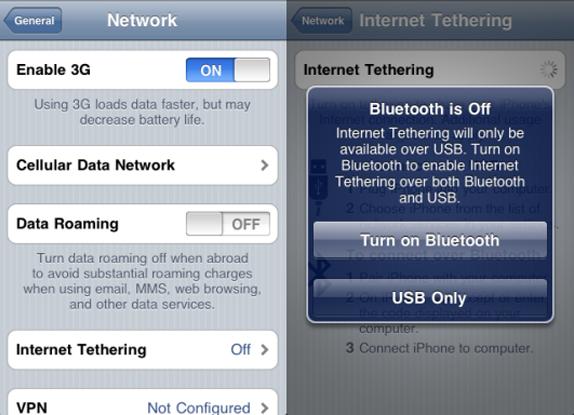
TetherMe has been updated to 1.3-12 version which is cracked .deb file and only compatible with iPhone jailbroken. It also support iPhone with iOS 4.0 or up. Dynamically enables native tethering for iOS3.X and iOS4.X+ devices. This should work on any carrier without the need for customized bundles or preferences.

NOTE: You MAY need to reboot your iDevice if upon installation or removal cellular service does not return. There is no icon for this item. After installation or reboot, tethering will be available to turn on in Settings -> General -> Network, or install the Tethering Toggle for SBSettings.


How To Install TetherMe Via Mobile Terminal

  • Download TetherMe.deb file here
  • After downloading the deb file above rename it to tether.deb
  • Copy it to var/mobile on your iphone and install using ifile or do the following
  • Open up mobile terminal
  • Type in su (press return)
  • Type in alpine (press return)(Change your default password due to security reason)
  • Type in dpkg -i tether.deb (press return)
  • Reboot and respring your iphone

Alternate Ways To Install:

Auto Installation

Ssh your iPhone. You may see instruction on how to install .deb file via SSH. And make a folder called AutoInstall in/var/root/Media/Cydia/ so you have /var/root/Media/Cydia/AutoInstall which is case sensitive and drop this debs file in the autoinstall folder, reboot and respring your iPhone.

Sunday, May 11, 2014

How To Install Safari Download Manager 1.5.0-1 .deb File For Free (iPhone & iPad)

This is an updated Safari Download Manager 1.5.0-1 only applicable with iPhone & iPad jailbroken. Safari Download Manager is an extension that adds a powerful, highly-configurable download manager to your web browser. Like never before, you can take control over downloaded file types, and harness the true power of the network connection on your device.

Note:
  • Safari Download Manager not allow you to view your downloaded files. It's recommend installing iFile or another comparable file manager.
  • To locate your downloaded file you may see some instruction using iFile here.

New Features:

● iPad, iPhone4 support
● iOS4 support
● Ability to select your download
destination for each download anywhere inside “/var/mobile”!
● Default download directory changed to ~/Media/Downloads
● Ability to resume almost all downloads
● Ability to configure number of retries
● Ability to configure number of concurrent downloads
● Download list saved across Safari restarts, downloads continue in background and resume on restart if Safari ever closes
● Will not overwrite current files, renames to a non-clashing name (e.g. “File-1.mp3″)
● Ability to download files larger than 2GB
● Tap-n-hold downloading of images to disk
● Various performance improvements, bug fixes, improved stability, better memory management, etc


How To Install Cracked Safari Download Manager
  • Download cracked .deb file here
  • Rename the downloaded deb to sdm.deb
  • Copy the file to var/mobile on your iphone
  • Open up mobile terminal on your iphone and do the following
  • Type in su (press return)
  • Type in alpine (press return)(Change your default password due to security reason)
  • Type in dpkg -i sdm.deb (press return)
  • Reboot and respring your iPhone or iPad


Alternate Ways To Install:

Auto Installation

Ssh your iPhone. You may see instruction on how to install .deb file via SSH. And make a folder called AutoInstall in/var/root/Media/Cydia/ so you have /var/root/Media/Cydia/AutoInstall which is case sensitive and drop this debs file in the autoinstall folder, reboot and respring your iPhone.

Monday, May 23, 2011

Brothers In Arms® 2: Global Front

Category: Games
Version: 1.1.2
Size: 257 MB
Price: $6.49


The stunning graphics and authentic settings are inspired by real life battlefields from WWII and created in detailed 3D. Take control of 3 different vehicles including the tank, off-road vehicle or glider to overrun your opponents - or to make a daring escape. You can even jump behind the vehicle turret to lay waste to foes with the machine gun. Challenge up to 5 friends to multiplayer battles on a variety of five maps in 3 different modes (Free For All, Team Deathmatch, Domination). You can connect locally via Bluetooth or even go online with Wi-Fi to battle friends anywhere.


Compatible with iPhone, iPod touch, and iPad. Requires iPhone OS 3.0 or later. You can purchase via direct iTunes link OR download cracked .ipa file code:

http://hotfile.com/dl/65141155/8e256f7/010.Brothers.in.Arms.2-v1.1.2-most_uniQue.ipa.html

How To Install iFile 1.4.1-1 .deb file For Free (iPhone & iPad)

This is an updated iFile 1.4.1-1 is cracked .deb file and only applicable with iPhone jailbroken. It works for iPhone, iPod touch and now Ipad. It allows fast navigation through the iPhone file system. You can directly view files of various types, e.g. movies, sound, text, HTML, Microsoft types, PDF, various compressed formats. For PDF files direct jumping to pages is possible. ZIP packing and compressed file unpacking is also supported. Files can be sent as email attachments. Text files and property lists can be edited. Folders and files can be bookmarked. In addition, files can be uploaded and downloaded from iFile’s built-in web server.

For those who would like to install the old version of iFile you can download it here.


How To Install cracked iFile 1.4.1-1 .deb file


Alternate Ways To Install:

Auto Installation

Ssh your iPhone. You may see instruction on how to install .deb file via SSH. And make a folder called AutoInstall in/var/root/Media/Cydia/ so you have /var/root/Media/Cydia/AutoInstall which is case sensitive and drop this debs file in the autoinstall folder, reboot and respring your iPhone.

Thursday, May 5, 2011

How To Install My3G 4.6.1 .deb file For Free

My3G has been updated to 4.6.1 version which is cracked .deb file and only compatible with iPhone jailbroken. It also support iPhone with iOS 4.0 or up. My3G makes Apps believe that they are on WiFi instead of 3G. With My3G, you can now watch HiDef YouTube videos, use Skype/Fring/Other VOIP apps over the 3G network.

If you would like to install the old version, you can download it here.


How To Install My3G Via Mobile Terminal

  • Download My3G .deb file here
  • After downloading the deb file above rename it to 3g.deb
  • Copy it to var/mobile on your iphone and install using ifile or do the following
  • Open up mobile terminal
  • Type in su (press return)
  • Type in alpine (press return)(Change your default password due to security reason)
  • Type in dpkg -i 3g.deb (press return)
  • Reboot and respring your iphone

Alternate Ways To Install:

Auto Installation

Ssh your iPhone. You may see instruction on how to install .deb file via SSH. And make a folder called AutoInstall in/var/root/Media/Cydia/ so you have /var/root/Media/Cydia/AutoInstall which is case sensitive and drop this debs file in the autoinstall folder, reboot and respring your iPhone.

Sunday, May 1, 2011

How To Install Lockdown Pro 2.0 .deb File For Free

This is cracked Lockdown Pro version 2.0 only applicable with iPhone jailbroken. you can lock or unlock applications directly from your springboard! Its as easy as holding down an icon to get into wiggle mode, then click the little lock icon on the bottom right corner of apps and folders to change that app to be locked or unlocked. Lockdown Pro works on iOS 3 and iOS 4! And it works for ALL iPod touches and iPhones. (iPad support is coming in version 2.1).

Features:
  • Be able to lock all applications AND folders you create. ·Lock/Unlock apps directly from your springboard.
  • SBSettings toggle available for Lockdown Pro (search for it in Cydia).
  • Can choose between alphabetic or numeric password.
  • Custom passwords for different applications.
  • Delay Lock, Lock application Delete, Lock application Movement, and more features..
  • Settings integrated into your native settings, so no extra icon taking up space on your springboard.
  • Retina Display lock/unlock graphics.
NOTE: Lockdown Pro does NOT come with an application icon, its settings are in your native settings application.


How To Install Lockdown Pro


Alternate Ways To Install:

Auto Installation

Ssh your iPhone. You may see instruction on how to install .deb file via SSH. And make a folder called AutoInstall in/var/root/Media/Cydia/ so you have /var/root/Media/Cydia/AutoInstall which is case sensitive and drop this debs file in the autoinstall folder, reboot and respring your iPhone.

Friday, April 29, 2011

How To Install FBhotosave 1.0 .deb File For Free

This FBphotosave 1.0 is cracked .deb file and only applicable with iPhone & iPad jailbroken. FBPhotoSave allows you to save photos from the Facebook.app directly in your camera roll, at the best quality available. Just keep your finger pressed a few seconds on the photo to let the popup appear: after pressing the ‘Confirm’ button, you’ll find the photo in your camera roll. FBPhotoSave works on all devices supported by the official Facebook app.

How To Install Cracked FBhotosave


Alternate Ways To Install:

Auto Installation

Ssh your iPhone. You may see instruction on how to install .deb file via SSH. And make a folder called AutoInstall in/var/root/Media/Cydia/ so you have /var/root/Media/Cydia/AutoInstall which is case sensitive and drop this debs file in the autoinstall folder, reboot and respring your iPhone.

Thursday, April 28, 2011

How To Install FaceBreak 1.40 .deb File For Free

This FaceBreak version 1.4.0 is cracked .deb file and only applicable with iPhone & iPad jailbroken. Enable FaceTime over 3G ! With 1 click and no setup, you can get FaceTime running over 3G and use it anywhere you want. No more looking up for nearby WiFi connection to use FaceTime. – Just install and Respring. FaceTime will now also work when on 3G!

NOTE:
  • If for some reason after a reboot FaceTime refuses to connect, just respring by Disabling and then Enabling FaceBreak inside the Settings Menu (under ‘FaceBreak’). Anyhow, you can avoid that by waiting 1 minute and then retry again.
  • FaceTime can be enabled/disabled from the iPhone Settings under “FaceBreak”.


How To Install Cracked FaceBreak


Alternate Ways To Install:

Auto Installation

Ssh your iPhone. You may see instruction on how to install .deb file via SSH. And make a folder called AutoInstall in/var/root/Media/Cydia/ so you have /var/root/Media/Cydia/AutoInstall which is case sensitive and drop this debs file in the autoinstall folder, reboot and respring your iPhone.

Monday, March 14, 2011

How To Install Barrel 1.5.0-1 .deb File For Free

This is cracked Barrel 1.5.0-1 only applicable with iPhone jailbroken. This tweak adds a 3D “cube” effect to your icon pages, similar to Compiz on Linux. In the tweak’s settings, you can customize the effect to have the icons appear as if you’re either inside or outside of the cube. iOS 3.x support is in beta. All modes have been tested and work on a 3.1.3 first generation device. There is some slight lag on some modes because of the slower device speeds, but it still works. Configure options from your Settings app. No new icons will be added to your home screen.


How To Install Barrel


Alternate Ways To Install:

Auto Installation

Ssh your iPhone. You may see instruction on how to install .deb file via SSH. And make a folder called AutoInstall in/var/root/Media/Cydia/ so you have /var/root/Media/Cydia/AutoInstall which is case sensitive and drop this debs file in the autoinstall folder, reboot and respring your iPhone.

Sunday, March 13, 2011

How To Install MyWi 4.52.2 .deb File For Free (iPhone & iPad)

This is an updated patch of MyWi 4.52.2 only applicable with iPhone & iPad jailbroken. Create an iPhone® WiFi HotSpot or iPad® WiFi HotSpot with a press of a finger! Wherever you are – you can connect your laptop or other mobile device to your iPhone®/iPad® easily to use your iPhone/iPad’s data connection. MyWi™ 4.0 has been rebuilt from scratch to bring iPhone WiFi tethering support to iOS 4! Will work with all jailbroken iPhones (including 2G/3G/3GS/4) and iPad on 3.1.2 or later.

If you want to install the old version of MyWi, you may check it out here.

New Features:
  • Create iPad or iPhone WiFi Hotspot to connect mutiple laptops or mobile devices to share your iPhone/iPad’s internet connection
  • 40 bit and 104 bit WEP Security to prevent others from accessing your WiFi HotSpot
  • Ability to enable USB and Bluetooth Tethering on your iPhone or iPad
  • Broadcasts the Network Name (SSID) – no need to fuss with creating an adhoc network on your laptop
  • Shows up and down bandwith usage for iPhone WiFi Tethering or iPhone USB Tethering
  • Uses less battery and much faster then other tethering apps due to native routing


How To Install And Patch Mywi

How To Patch Mywi

  • If the “Full” version is installed, uninstall this version first! then install MyWi with Cydia, then run the patch (install the deb-file).
OR
  • Update your MyWi with Cydia, then run the patch (install the deb-file).
  • Reboot (Respring will bring up “Save Mode” !) and done
  • uninstall the patch with Cydia (not needed any more)

How To install Mywi Via Mobile Terminal

Alternate Ways To Install:

Auto Installation

Ssh your iPhone. You may see instruction on how to install .deb file via SSH. And make a folder called AutoInstall in/var/root/Media/Cydia/ so you have /var/root/Media/Cydia/AutoInstall which is case sensitive and drop this debs file in the autoinstall folder, reboot and respring your iPhone.

Saturday, March 5, 2011

New Cydia Theme Center

It’s not easy to find your favorite one out of hundreds of iPhone themes. Browsing themes in cydia is sometimes considered as a tedious task. You have to tap through several buttons before you can preview a theme and usually the preview page is loaded with ads. There is a good news for jailbroken iPhone owners. Jay Freeman the developer of cydia has rolled out the Theme Center in cydia. Theme Center offers a much much better way to browse and download iPhone themes.


Simply tap on the button will bring you to the new Theme Center and access the theme library. You are allowed to select themes based on the model of your iPhone. If you’re using iPhone 4, you probably would opt for the HD themes with Retina support. Previewing a theme has never been so easy. With a single tap on the selected theme, the Theme Center will offer you a nice theme preview. If you love the theme, just tap the “Package” button and install it right away. According to the developer, all themes available are selected from the top selling vendors in cydia, as well as, free themes selected by folks at MacCiti and ModMyi. New themes will be added on biweekly basis. To avoid low-quality content, additional featured themes must go through nominations via one of the theme partners including MacCiti, ModMyi or Planet-iPhones). In future, however, the plan is to allow users to nominate themes directly to cydia rather than going through the partners.


If you love to skin your iPhone with some nice themes, go ahead to check out Theme Center on Cydia.

Friday, February 18, 2011

How To Install YourTube 2.0-1 .deb file For Free (iPhone & iPad)

YourTube has been updated to 2.0-1 version to let you watch and save HD YouTube videos directly to your iPhone or iPad’s iPod library. This is the “cracked” version of YourTube 2.0-1 application and that means you don’t have to pay a dime for this app.

You can purchase YourTube HD for the iPad from the Cydia Store for $5. If you want to purchase it from Cydia then go ahead but if you would like to first try it out with our Cracked Version of the very same App then follow the tutorial below.


How To Install YourTube 2.0-1 (Cracked) .deb file


Alternate Ways To Install:

Auto Installation

Ssh your iPhone. You may see instruction on how to install .deb file via SSH. And make a folder called AutoInstall in/var/root/Media/Cydia/ so you have /var/root/Media/Cydia/AutoInstall which is case sensitive and drop this debs file in the autoinstall folder, reboot and respring your iPhone.